Description
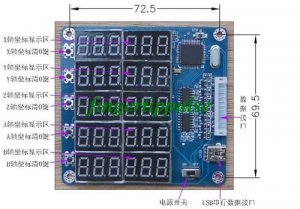
This product comes standard with HY-TB5DV-M driver board, using the appropriate cable docking HY-TB5DV-M driver board corresponding to digital interface, digital products obtained directly from the drive plate into the 5V power supply, no external power supply is
Steps
A: Use the appropriate cable docking HY-TB5DV-M driver board and then open the corresponding digital display interface, power switch, 5-axis digital display origin 0
B: Set each axis 0. 1MM amount required pulse
1: Press Setup (STP) button, 5-axis digital display flashing display area, said the state has entered the set
2: Press the 0 key to clear the corresponding bit axis, the corresponding axis display area plus 1 to 0. 1MM value of the required amount of stop pulse.
3: Press Set (STP) button, 5-axis digital display area without blinking, that is set OK, exit the setting mode, display the status of work into
C: 5-axis display real-time display synchronized 5-axis coordinate value
D: display status of work to 0 by the corresponding axis key, the corresponding axis display coordinates to 0
Setting an example: If the X-axis 0. 1MM pulse required is equal 10, Y-axis 0. 1MM pulse required is equal 20, Z axis 0. 1MM pulse volume equal to the required 30.
1: Press Setup (STP) button, display blinking, into the set state
2: X-axis under the key 10 to 0, X-axis digital value equal to 10
3: Press the Y axis to 0 under the key 20, Y-axis digital value equal to 20
3: Z-axis to 0 by the next key 30, Z-axis digital value equal to 30
4: Press Setup (STP) key, display stops flashing to exit the setting mode
5: Setting success. Will automatically set the parameters permanently stored until the next set will be refreshed after the success of setting parameters
Package list:
1 x 5 Axis Digital Display Panel
TE93